RoboArm 2026 Calendar Subscription
Subscribe to the live calendar feed to sync all workshop schedules, lecture times, and project deadlines directly to your personal calendar application. Updates published by organizers sync automatically.
Manual Subscription
If you have Google Calendar OR another client like Thunderbird, use the manual link below.
Copy the feed link:
https://cloud.rsadelft.nl/remote.php/dav/public-calendars/ngAtTB7nEwbt7eb5?export
Adding to Google Calendar
You must complete these steps on a PC/laptop or enable Desktop site / Desktop mode in your phone's browser, otherwise Google Calendar hides the "Add from URL" option.
-
In Google Calendar, find Other calendars on the left sidebar, click the
+icon, and select From URL.
-
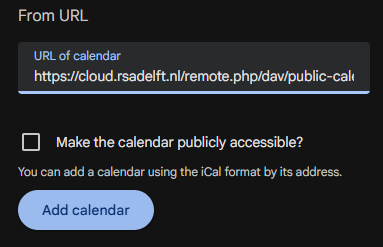
Paste the copied link into the URL of calendar field and select Add calendar.
1-Click Subscription
Select your calendar platform below to subscribe instantly:
- 🍎 Subscribe with Apple Calendar / Default Desktop Client
- 💼 Add to Outlook (TU Delft / School Account)
Ensure you select "Subscribe" or "From URL" rather than downloading the .ics file directly. Subscribing ensures all schedule revisions and deadline extensions update in real time.